Footer
To edit the footer, go to Appearance > Widgets or Appearance > Customize > Widgets. The contact form area is a block (WPForms), while the address area is a right-aligned paragraph block.
Menu
To edit the menu, go to Appearance > Menus or Appearance > Customize > Menu. There are a total of 2 menus, “Main” & “Social Links”. The “Main” menu controls the menu on the top left of the site, while the “Social Links” controls the top right menu on the site.
Social Media sharing
To edit the image on the social media thumbnail, go to Appearance > Customize > Site Identity. Note that this does not immediately get reflected on social media sites. For the changes to be reflected, you need to clear cache. Find out in the next section.

Caching
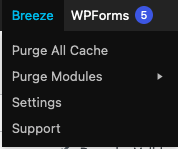
The website has a caching plugin (Breeze) that essentially compiles the site and saves the output so that it does not have to compile the page each time a user loads the page. When you edit content and find that the changes are not getting reflected on the site, try purging the cache. You can do so via the Breeze menu on the top of the admin panel. Breeze > Purge All Cache.